
Downgrading Your PDA’S SnapTracker PPC Application to the SIF-Generated Version
Before starting the downgrade process, ensure that there is no active batch on the device. Once all batches are uploaded successfully, the current PPC needs to be removed from the device.
Follow these steps on the PDA.
Ensure the SnapTracker application on the device is closed and you have exited the application.
- From the Home Screen Tap Start or the Windows Icon.

- Tap Settings.

- Tap System.

- Tap Remove Programs.

- Remove the following Programs from the device.
- KiSP Inc. SnapTracker PDA.
- Microsoft .NET CF 2.0.
- SQLServerCompact 3.5 Core.
- SQLServerCompact 3.5 Repl.
- SQLServerCompact 3.5 Tools EN.
- Tap to select any of the programs from the above list. The selected program should be highlighted.

- Tap Remove.

- Select Yes when prompted to confirm the removal of the program.
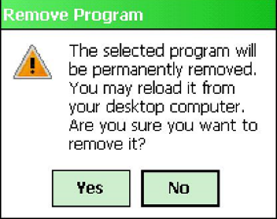
Repeat steps 5 through 8 until all the programs (a through e) are removed.
Step 2 – Installing the SIF-Generated PPC
- Copy all the downloaded files to your Flash Drive.
- Remove the Flash Drive from your Desktop and Insert it into the USB Port on the docking station (the USB Port is located on the left side of most docking station)
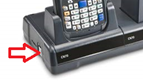
- From the Home Screen Tap Start or the Windows Icon.
- Tap Programs.

- Tap File Explorer.

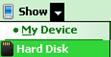
- From the Folder Dropdown, select Hard Disk.
- Select the Folder that contains the downloaded application.
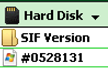
- Tap Sort By and Select Size.

- Install the last 5 files on the list in the order they display.

- Sqlce.repl.ppc…
- Sqlce.ppc.wce…
- NETCFv2.wm…
- SnapTracker…
- Sqlce.dev.ENU…
- Tap the filename to run the first program from the list above. When prompted select Device.
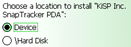
- Tap Install.

- When the installation confirmation message displays, tap OK.

Return to the Folder and repeat steps 10 -12 until all the programs (a through e in the above list) are installed.
Uploading Batches to SnapTracker
After you have completed your scanning/inventory routines and need to upload the batch to SnapTracker follow the steps outlined below.
Step 1 – Generate a SIF file to Upload
- From within the SnapTracker application navigate to Main Menu.
- From the Select an option dialog box, tap Upload.
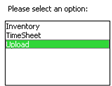
- To create the SIF file, tap Generate.

- *Tip: Make a note of the file # on the SIF generated confirmation window so you know what file to copy.
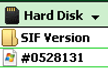
- To close the SIF generated confirmation window, tap OK.
- Exit the SnapTracker application and return to the device Home Screen.
Step 2 – Copy File from Device to Flash Drive
- Insert a Flash Drive into the USB Port on the docking station.
- Tap Start or Windows Icon.
- Tap Programs.
- Tap File Explorer.
- From the Folder Dropdown, select My Device.

- Tap the Program Files Folder.

- Tap the SnapTracker Folder.

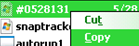
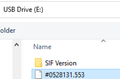
- Hold down on the File Name (for example #0528131.553) that was generate during Step 1.
- When the context menu displays, select Copy.
- From the Folder Dropdown, select Hard Disk.
- Tap and Hold any part of the screen until the context menu displays

- Select Paste from the context menu, the SIF file should now be on the Flash Drive
- Remove the Flash Drive from the docking station.
On Your Computer
- Insert the Flash Drive into a USB Port on your computer.
- Open a web browser and sign into the SnapTracker web interface.
- From the Left Navigation select PDA Processing>Process Batch. The Process Batch screen displays.
- On the Process Batch Screen, click Upload File. The Search Upload Scanner screen displays.
- Click Choose File.
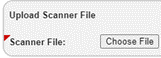
- Browse to the Flash Drive and select the SIF generated file.
- Click Upload File Now.

The Search Upload Scanner screen closes, and a batch is generated.
You can choose to continue working with the batch within the SnapTracker web interface or sign out of the application.