
SnapTracker Interface: Active Customer
SnapTracker enables you to manage product for all customers you have access to. You can easily identify and switch your selected customer for efficient database management.
Before starting, ensure you are logged in to SnapTracker.
This post outlines how to identify and change your active customer.
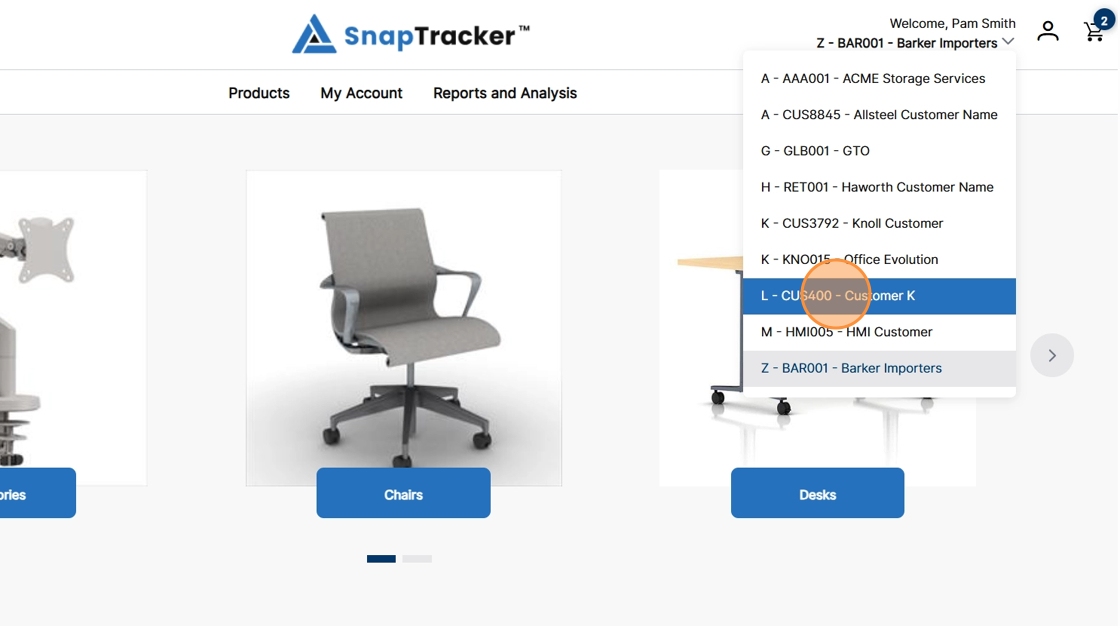
Observe the active customer. The selected customer displays in the header section below your user name.

1. Click the dropdown arrow to change to another customer you have access to.

Observe the list of customers you have access to displays, with the selected customer highlighted.

2. Click another customer from your list to change the selected customer.
3. The customer changes and the new customer is selected. Observe the changes in the header logo and the Home Screen.
